VectorCraft
Vector illustration · Adobe Illustrator alternative
Pen, Pathfinder, gradient mesh and SVG/PDF in a fast, free vector editor.
Image editing · v0.8.2 · Early alpha
PhotoCraft is the image editor of the ArtCraft Crafting Apps: an open-source, clean-room reimplementation of Adobe Photoshop. It opens, edits and saves layered PSD files, has adjustment layers, layer styles, smart objects, a real brush engine and 67 tools, and runs natively on Windows, macOS, Linux and FreeBSD, or right here in your browser.
The online version is the official web build from the v0.8.2 release (2026-10-12). It runs locally in your browser; a desktop browser with WebGPU or WebGL2 works best.
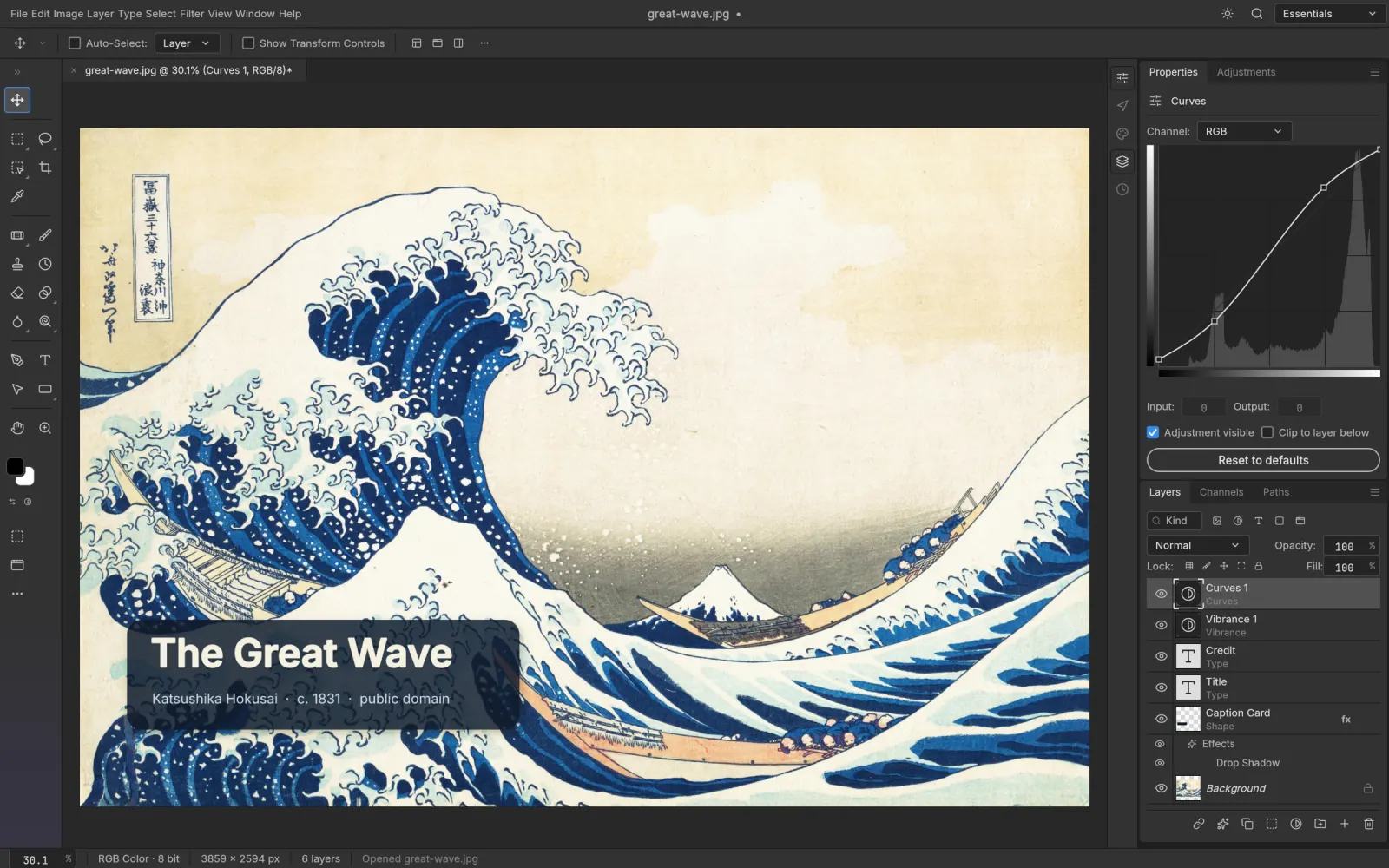
Open, edit and save layered Photoshop documents. Re-saving keeps the render of 307 of the 309 psd-tools test files, and type layers round-trip as editable text.
16 non-destructive adjustment layers including Curves, Levels with a live histogram, Hue/Saturation, Black & White, Channel Mixer, Gradient Map, Selective Color and Color Lookup.
Drop Shadow, Inner Shadow, Outer and Inner Glow, Bevel & Emboss, Satin, Stroke and Color, Gradient and Pattern Overlay, live on any layer including type.
Marquees, lassos, Magic Wand, Quick Selection, Object Selection and Select Subject, plus Select and Mask for hair-fine edges. It all runs locally, with no cloud and no account.
Blurs (including the Blur Gallery), sharpening, Reduce Noise, distortions, Oil Paint, Lens Flare, Lighting Effects and more, previewed on the canvas and editable as smart filters.
Menus, panels, tools and shortcuts sit where Photoshop users expect them, from ⌘J to ⇧⌘D. 8, 16 and 32-bit RGB, Grayscale, CMYK and Lab with real ICC color management.
photocraft-0.8.2-windows-x64.msi (or the portable zip; ARM64 and x86 builds exist).photocraft-0.8.2-macos-universal.dmg, which is signed and notarized for Apple Silicon and Intel..deb, .rpm or Flatpak for your distro.SHA256SUMS.txt in the same release.Yes. PhotoCraft opens, edits and saves layered PSD files, including adjustment layers, layer styles, shape layers and editable type. Upstream's tests re-save 307 of the 309 files in the psd-tools corpus with a matching render.
Not yet. It is in early alpha. Everyday layer, mask, adjustment, type and filter work is there, but generative AI tools, some specialist tools and third-party plug-ins are still missing.
No. PhotoCraft is an independent, clean-room project by the ArtCraft team (GitHub: storytold). It does not use Adobe code.
Yes. PhotoCraft is free and open source under MIT OR Apache-2.0. There is no subscription, no account and no telemetry.
Yes. PhotoCraft compiles to WebAssembly, and this site hosts the official v0.8.2 web build at artcraftsuite.org/app/photocraft/. It runs entirely in your browser, and files you open are not uploaded.
Only from getartcraft.com/apps/photocraft or the Releases page of github.com/storytold/photocraft. Avoid look-alike GitHub repos that offer a "local zip" or password-protected archive: they are not the official project.
Yes. Releases include Windows installers and portable zips (x64, x86, ARM64), a universal macOS DMG, Linux AppImage, deb, rpm and Flatpak (x86_64 and aarch64), FreeBSD builds and the web version.
PhotoCraft is one of the ArtCraft Crafting Apps, developed in the open at github.com/storytold/photocraft. It is a clean-room project and is not affiliated with Adobe.
Vector illustration · Adobe Illustrator alternative
Pen, Pathfinder, gradient mesh and SVG/PDF in a fast, free vector editor.
Video editing · Adobe Premiere Pro alternative
A free non-linear video editor with Lumetri-style color, pro audio and its own codecs.
Photo library & RAW · Adobe Lightroom alternative
Non-destructive RAW development and a photo library, free and private.